
Public Cloud V2.0
API Introduction
Public Cloud OpenAPI V2.0 is an open platform based on RESTful specifications, designed to provide developers with data interoperability and business integration between third-party cloud platforms and the DJI FlightHub 2 Public Cloud.
Through OpenAPI V2.0, developers can build system integrations around organizations and members, devices, flight tasks, livestreams, and other data to power use cases such as device supervision, task supervision, and livestream applications.
Compared with V1.0, V2.0 adds more query and business-scenario interfaces on top of the existing capabilities. It also restructures the interface system by separating Public Cloud and On-Premises interface documentation, making categorization clearer for faster developer onboarding and integration, and enabling more agile iteration of OpenAPI in the future.
Feature List
| Feature | Description |
|---|---|
| Organization, Project, and Member Information Query | Provides query capabilities for organization list, project list, user list, permission list, role permissions, and more. |
| Device Information Query | Retrieves device lists under organizations or projects, project device details, device history topology, HMS information, thing-model information, video stream clarity, and more — for device asset management and status display. |
| Flight Tasks | Supports creating flight tasks, querying task lists, task details, flight trajectories, media resources, flight record downloads, operation logs, AI flight alerts, and more. |
| Real-Time Control | Supports querying device control authority status, acquiring control authority, switching cameras, and more. |
| Livestream and Forwarding | Supports starting livestreams, querying recording tasks, and creating, querying, and deleting stream converters. |
| Flight Route Query | Supports retrieving the flight route list under a project, getting flight route details, and more. |
| Model Reconstruction | Supports starting reconstruction tasks using media data collected from FlightHub flight tasks. |
| Open Modeling | Supports starting reconstruction tasks using media data from third-party clouds. |
Interface Documentation
- The interface documentation includes the OpenAPI feature list, tutorials, interface list, and interface descriptions. Refer to: OpenAPI Interface Documentation.
Sample Source Code
After deploying and successfully running the sample source code, you can experience the feature interface developed based on OpenAPI V2.0. The sample source code also helps you quickly understand how to access and use OpenAPI, accelerating your development and integration.
Click Sample Source Code to obtain the source code and access guide.
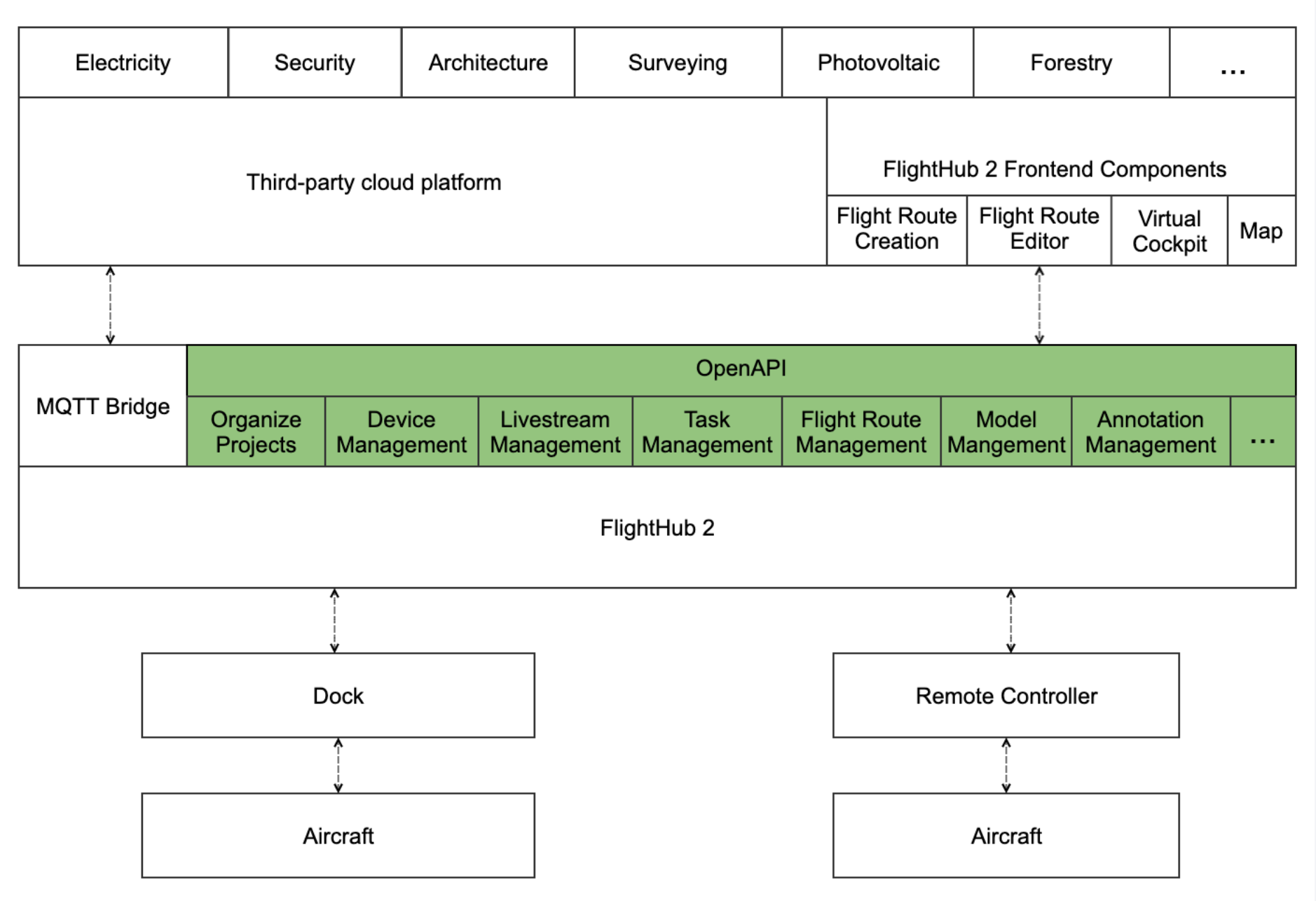
Product Architecture
Quick Start
Authentication and Authorization
Refer to the document Authentication and Authorization Tutorial to understand the principles of OpenAPI authentication and authorization, and obtain X-User-Token and X-Project-Uuid. These two parameters must be passed in the header field of most interfaces to ensure the security of OpenAPI and to implement access control to FlightHub 2.
Sample Code
1. Query FlightHub 2 System Status
FlightHub 2 Public Cloud calls the interface to query system status: Query FlightHub 2 System Status
```http
GET /openapi/v2.0/system_status HTTP/1.1
Host: 127.0.0.1:30812
X-Language: en
X-Request-Id: 550e8400-e29b-41d4-a716-446655440000
X-User-Token: xxxxxxxx
A return value of 0 indicates that the FlightHub 2 system is operating normally:
```http
{
  "code": 0,
  "message": ""
}
2. Get the List of Projects Under the Organization
Create an organization, set up a project, and bind devices in FlightHub 2. Refer to the "Platform Basics > Organization Management" section of this manual for creating organizations and projects in FlightHub 2, then call the Get the List of Projects Under the Organization interface to obtain the list of created projects.
GET /openapi/v2.0/project?usage=complete&sort_column=create_time&sort_type=desc&page=1&page_size=20 HTTP/1.1
Host: 127.0.0.1:30812
X-Language: en
X-Request-Id: 550e8400-e29b-41d4-a716-446655440000
X-User-Token: xxxxxxxx
The list of created projects will be returned:
```http
{
  "code": 0,
  "message": "",
  "data": {
    "list": [
      {
        "name": "c2c_test",
        "introduction": "a",
        "uuid": "93df839d-ae74-4f04-842e-2f1f81c89a66",
        "org_uuid": "105ddd05-34ce-46b6-a872-cb32b8c98f64",
        "created_at": 1702498686,
        "updated_at": 1702498686,
        "project_work_center_point": {
          "latitude": 22.906899500237845,
          "longitude": 113.69995967214662
        }
      }
    ]
  }
}
3. Start Livestream
Refer to the Device Management section of this manual to bind devices in FlightHub 2, then refer to the Livestream Management Tutorial and call the Start Livestream interface to start streaming.
```http
POST /openapi/v2.0/live-stream/start HTTP/1.1
Host: 127.0.0.1:30812
X-Project-Uuid: xxxxxxxxxx
X-Language: en
X-Request-Id: 550e8400-e29b-41d4-a716-446655440000
Content-Type: application/json
X-User-Token:  xxxxxxxx
Content-Length: 119

{
    "sn": "7CTDM3Dxxxxxx",
    "camera_index": "165-0-7",
    "video_expire": 7200,
    "quality_type": "adaptive"
}
Returns the livestream authorization information at data.url. The stream must be pulled using the SDK of the corresponding provider indicated by data.url_type:
```c
{
  "code": 0,
  "message": "",
  "data": {
    "expire_ts": 1779446430,
    "url": "http://127.0.0.1:30806/rtc/v1/whep/?app=live&stream=7CTDM3Dxxxxxx_165-0-7&token=eyJhbGciOiJIUzI1NiIsInR5cCI6IkpXVCJ9.eyJwcm9kdWN0X2lkIjoiNzEzNTE5ZmIxYjRlNDRiYTlkMjdkMDJhOGRlZDk5NGQiLCJjaGFubmVsX25hbWUiOiI3Q1RETTNEMDBCWk5WWl8xNjUtMC03IiwidWlkIjoxDAxMTQsImFjdGlvbiI6InBsYiLCJleHAiOjE3NjQ3NTE2MzAsIm5iZiI6MTczMzIxNTYzMCwiaWF0IjoxNzMzMjE1NjMwfQ._AysitutpprlgYGFy4lDL_gSv4Y3hl_te-yxoFVHZb4",
    "url_type": "srs"
  }
}