
On-Premises V2.0
On-Premises OpenAPI V2.0 is an open platform based on RESTful specifications, designed to provide developers with data interoperability and business integration between third-party private cloud platforms and the FlightHub 2 on-premises version.
Through OpenAPI V2.0, developers can perform data integration and custom development around core modules such as device management, flight task management, and data management (media, models, and map data). This enables business integration capabilities based on FlightHub 2, including data interoperability and management, device management, task scheduling, and lightweight real-time control.
Compared with V1.0, V2.0 aims to support complete business workflows for custom development scenarios. It systematically adds APIs for the core modules listed above, expanding the number of interfaces from 67 in V1.0 to more than 300.
In addition, V2.0 optimizes the interface framework by maintaining separate interface documentation for public cloud and private cloud. This makes interface categories clearer, helps developers find information and integrate interfaces, and supports continued iteration of the interfaces.
Feature List
| Feature | Description |
|---|---|
| Organization and Project Management | Provides query and management capabilities for projects, members, and role permissions. |
| Device Management | Supports device queries and management, including device lists, real-time status, thing-model shadow, HMS health events, and network and RTK configuration, to build device management and configuration systems. |
| Flight Tasks | Supports creating flight tasks, querying task lists and execution details, flight records, and AI alerts, to build flight task management systems. |
| Real-Time Control | Supports querying and acquiring cloud control authority and issuing commands such as FlyTo, POI orbit, and camera control, enabling lightweight, business-level real-time control. |
| Livestream | Supports livestream and bypass streaming management, switching lenses and video quality, and more, to build livestream management systems. |
| Media Management | Supports querying, managing, and downloading media files to build media management systems. |
| Model Management | Supports initiating reconstruction tasks and managing model assets to build model management systems. |
| Flight Route Management | Supports retrieving flight route lists, managing flight route files, and more, to build flight route file management systems. |
| Map Data Management | Supports annotation management, custom flight area management, signal heatmap queries, and more. |
| Change Detection | Supports initiating change analysis tasks and querying detection results for scenarios such as construction monitoring and inspection comparison. |
| Open Modeling | Supports initiating modeling tasks using media data from third-party platforms. |
Interface Documentation
The interface documentation includes the OpenAPI feature list, tutorials, interface list, and interface descriptions. For details, refer to: OpenAPI Interface Documentation.
Sample Source Code
After deploying and successfully running the sample source code, you can explore the user interface for features developed using OpenAPI V2.0. The sample source code also helps you quickly understand how to access and use OpenAPI, accelerating development and integration.
Click Sample Source Code to obtain the source code and integration guide.
Product Architecture
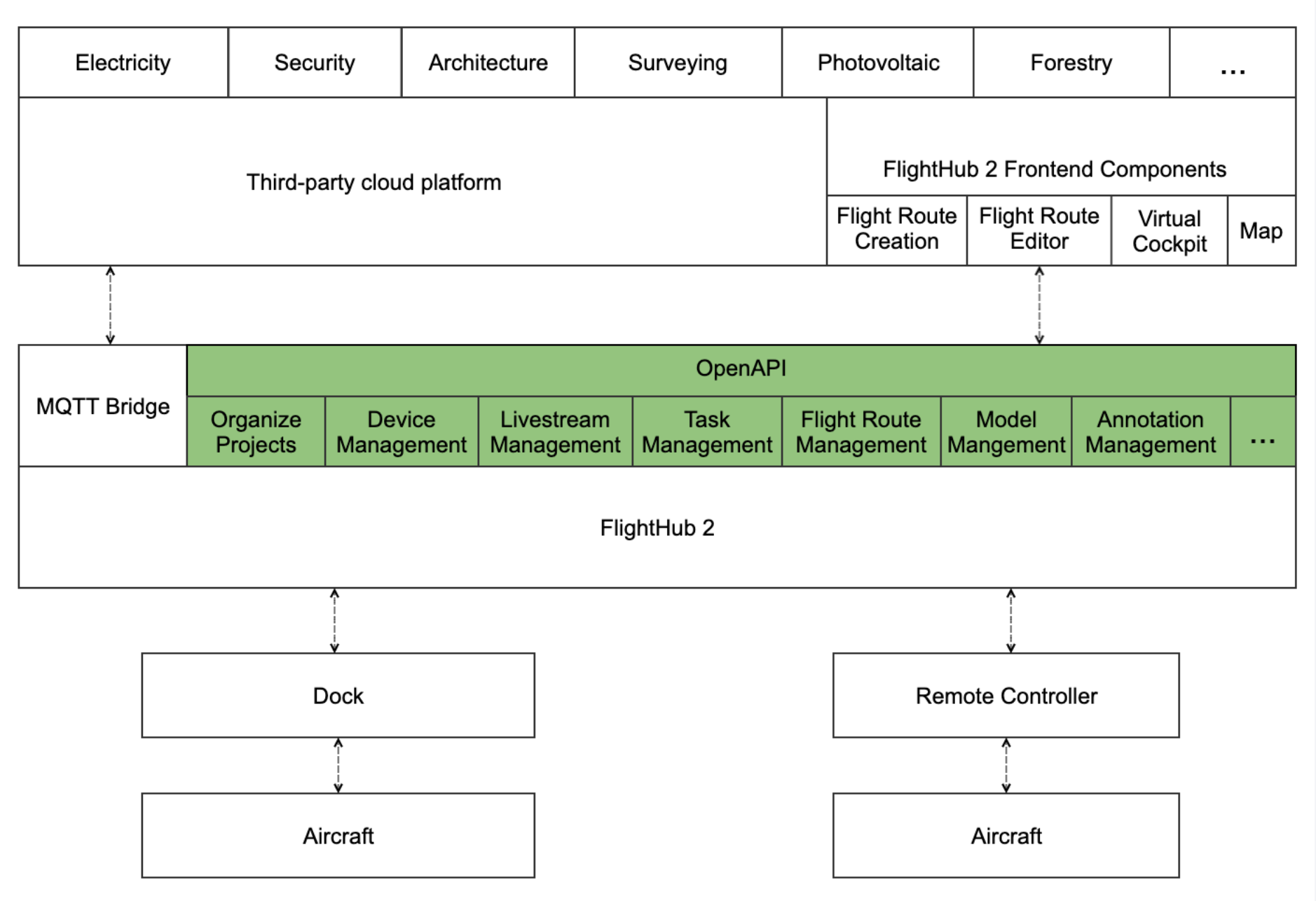
Quick Start
Environment Setup (specific to the FlightHub 2 on-premises version)
Refer to the Deployment Process section of the DJI FlightHub 2 On-Premises Version Deployment Manual to deploy the on-premises version.
Authentication and Authorization
Refer to the Authentication and Authorization Tutorial to understand the principles of OpenAPI authentication and authorization and obtain x-user-token and X-Project-Uuid. These two parameters are passed in the headers of most interfaces to ensure OpenAPI security and implement access control to FlightHub 2.
Note: Starting with the on-premises version V2.1, an organization can have multiple Token values. You can manage them in the FlightHub 2 console under My Organization → Organization Settings → OpenAPI Key Management. You can assign different Key values to different users, tenants, and organizational entities.
Sample Code
1. Query the FlightHub 2 Real-Time Control Service Status
After the FlightHub 2 on-premises version is successfully deployed, call the interface to query the real-time control service status: Query FlightHub 2 System Status:
```http
GET /openapi/v2.0/drc/health HTTP/1.1
Host: 127.0.0.1:30812
X-Language: en
X-Request-Id: 550e8400-e29b-41d4-a716-446655440000
X-Project-Uuid: xxxxxxxxxx
x-user-token: xxxxxxxx
A return value of 0 indicates that the FlightHub 2 real-time control service is operating normally:
```http
{
  "code": 0,
  "message": "OK",
  "data": null
}
2. Get the List of Projects Under the Organization
Create an organization, create projects, and bind devices in FlightHub 2. Refer to the "Platform Basics > Organization" section of this manual to create organizations and projects in FlightHub 2, then call the Get the List of Projects Under the Organization interface to obtain the list of created projects.
GET /openapi/v2.0/manage/api/v1/organizations/{uuid}/projects?usage=complete&sort_column=create_time&sort_type=desc&page=1&page_size=20 HTTP/1.1
Host: 127.0.0.1:30812
X-Language: en
X-Request-Id: 550e8400-e29b-41d4-a716-446655440000
X-Project-Uuid: xxxxxxxxxx
x-user-token: xxxxxxxx
The list of created projects is returned:
```http
{
  "code": 0,
  "message": "OK",
  "data": {
    "list": [
      {
        "name": "c2c_test",
        "introduction": "a",
        "uuid": "b2c3d4e5-6789-0123-bcde-f12345678901",
        "project_id": "PRJ202401001",
        "org_uuid": "a1b2c3d4-5678-9012-abcd-ef1234567890",
        "status": "active",
        "c2c_enable": true,
        "dock_rotation_disabled": false,
        "c2c_task_enable": true,
        "created_at": 1700000000,
        "updated_at": 1700100000
      }
    ]
  }
}
3. Start Livestream
Refer to the Device Management section of this manual to bind devices in FlightHub 2, then refer to the Livestream Management Tutorial to use the interfaces to start streaming.
```http
POST /openapi/v2.0/drc/api/v2/projects/{proj_uuid}/live-channels/stream/start HTTP/1.1
Host: 127.0.0.1:30812
X-Project-Uuid: xxxxxxxxxx
X-Language: en
X-Request-Id: 550e8400-e29b-41d4-a716-446655440000
Content-Type: application/json
x-user-token:  xxxxxxxx
Content-Length: 130

{
    "sn": "1ZNBH1Dxxxxxxx",
    "camera": "165-0-7",
    "video": "normal-0",
    "gateway_sn": "7CTDM3Dxxxxxxx",
    "video_quality": 0
}
A return value of 0 indicates that the streaming task has been successfully dispatched, and the device will start streaming to the media server according to the configuration:
```c
{
  "code": 0,
  "message": "OK",
  "data": null
}