
Purchase and Activation
This page describes the purchase channels, activation validity, and activation methods for DJI FlightHub 2 packages, as well as the free resources that can be claimed when a device is bound for the first time.
1 Purchase and Activation
Available through the DJI Store and authorized dealers. The specific purchase channels for different packages are as follows:
| Deployment | Package | DJI Store | Dealer |
|---|---|---|---|
| Public Cloud | Business | Supported | Supported |
| Enterprise | Supported | Supported | |
| Resource Supplement PackagesMapping recharge, livestream recharge, storage space expansion | Supported | Supported | |
| Private Cloud | On-premises (Private Version) | Not Supported | Supported |
1.1 Activation Validity Period
Please activate within the activation period; otherwise the package will expire
The activation period is calculated from the delivery date of your activation code (sent via email or SMS to your email or phone).
| Deployment | Package | Activation Period |
|---|---|---|
| Public Cloud | Enterprise Package | Unlimited |
| Other PackagesBusiness 1-month, Business 1-year, mapping recharge, livestream recharge, storage space expansion | 6 months | |
| Private Cloud | On-premises Package | Unlimited |
1.2 Important Notes
Non-refundable, non-exchangeable, and non-transferable after activation
- After a successful purchase, the DJI FlightHub 2 activation code will be sent to your email or phone via email or SMS.
- If the activation code has not been used within 30 calendar days of delivery, a refund can be requested.
- Once activated, refunds or exchanges will not be provided, nor can the package be transferred to another organization.
- The package takes effect immediately upon activation. The validity period begins on the date of activation.
1.3 Activation Steps
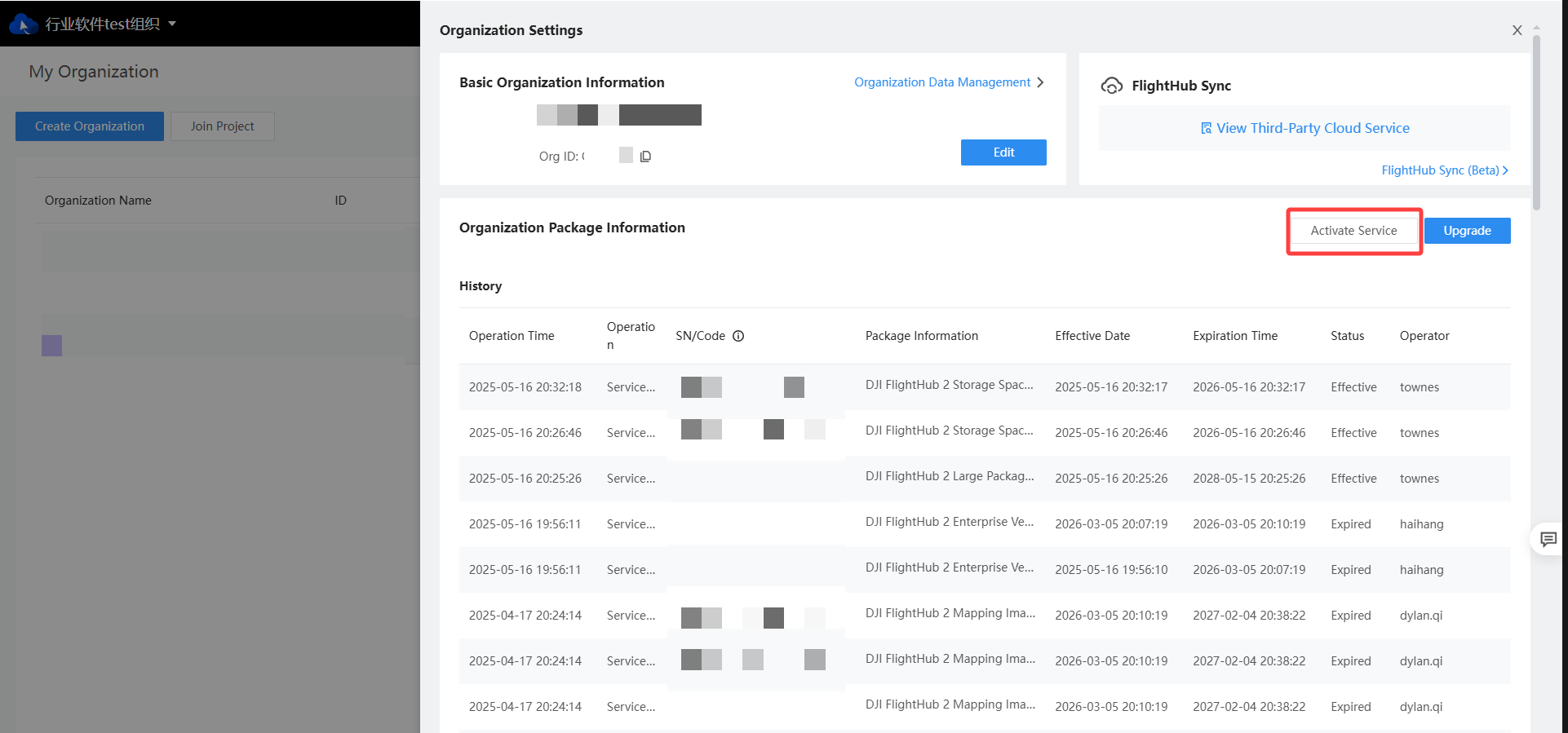
- Log in to DJI FlightHub 2 and click the top-right corner to go to the My Organization page.
- Click the Settings button of the organization you want to activate the package for, and enter the Organization Settings page.
- In the Organization Package Information panel, click Activate Service to enter the activation page.
- Confirm the organization name and organization ID, and enter your activation code.
- Click Activate Now.
2 Giveaway Policies
2.1 Device Binding Giveaway
When an organization binds its first device (dock or aircraft) for the first time, it can claim free resources:
Storage Space
100 GB
Livestream Minutes
5,000 min
Mapping Images
3,000 images
Validity Period
3 months
Each organization and each device can claim the bonus only once
- An organization can only claim the bonus once. If the organization has already claimed it, binding additional devices will not grant another bonus.
- A device can only be used to claim the bonus once. If a device has already been used to claim a bonus, rebinding it to another organization will not grant another bonus.
2.2 Livestream Minutes for Multimodal AI Object Detection
All organizations receive a free grant of 1,000 minutes of livestream minutes, which can only be used for Multimodal AI Object Detection in the Virtual Cockpit.