
Airspace Alert
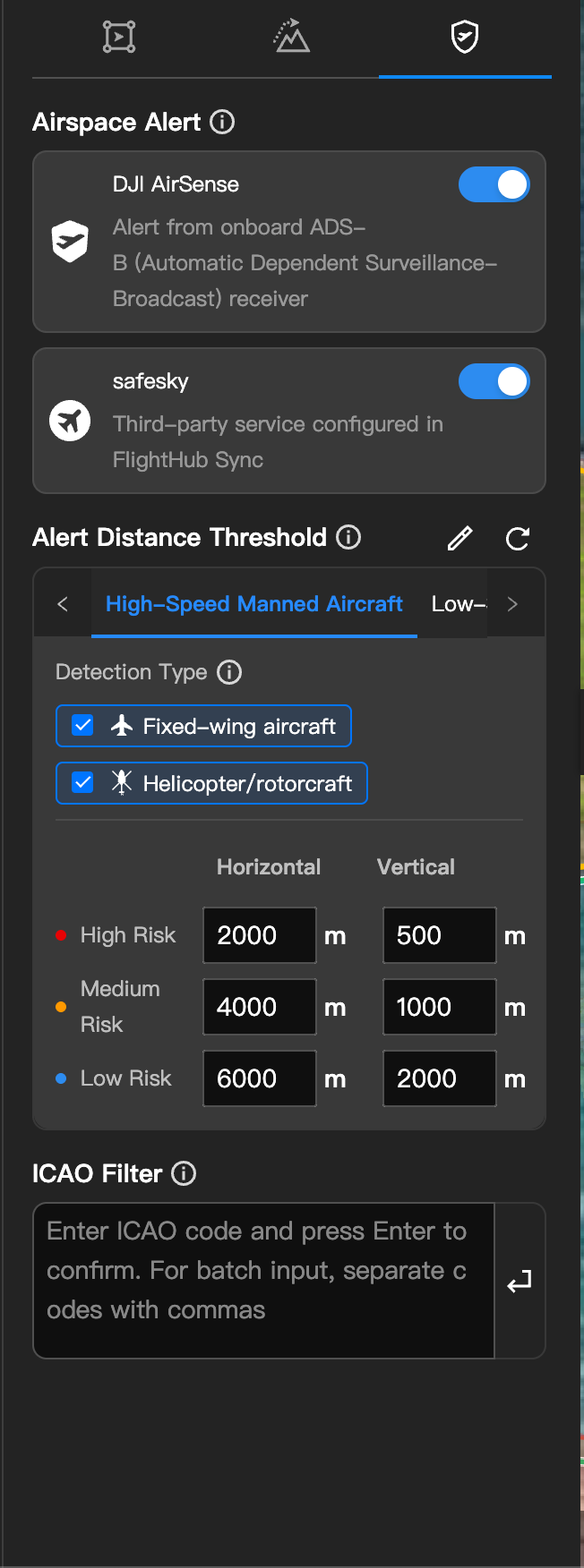
The "Airspace Alert" section consists of two sub-modules: "System Settings" and "Alert Settings".
1. System Settings
Displays the airspace alert systems currently available, including DJI AirSense, DJI O4 Ground Station (used with an airspace broadcast receiver), and external airspace systems configured in FlightHub Sync (such as SafeSky). You can enable any of them individually or simultaneously. When multiple sources are enabled, the system automatically deduplicates the same target from different sources to avoid duplicate alerts.
If no external airspace system has been configured, click "Add External Airspace Data Management System" to jump to FlightHub Sync for configuration.
Once DJI O4 Ground Station is enabled together with an airspace broadcast receiver, the following capabilities become available:
- Real-time display on the map of nearby aircraft detected by the airspace broadcast receiver
- Push notifications via the message box when an alert is triggered
- Automatic backend recording of alert data, with support for exporting the history
2. Alert Settings
The alert settings apply to all enabled airspace systems and affect all users within the project. Please configure them as needed.
- Alert Distance Threshold: For high, medium, and low collision risk levels respectively, configure the horizontal and vertical safety distances for three aircraft categories: "High-Speed Manned Aircraft / Low-Speed Aircraft / Drones". Click "Edit Type" to adjust which specific aircraft types belong to each category (a given aircraft type can only belong to one rule).
- ICAO Filter: Enter the ICAO codes of aircraft to ignore (multiple codes separated by English commas). Aircraft in the list will not trigger alerts.
- Aircraft Type Filter (visible only when an external airspace system is enabled): Filter specific aircraft categories in bulk by aircraft type.
When airspace alerts are enabled, nearby aircraft are displayed on the Cockpit map in real time, where you can view their ICAO code, altitude, speed, and other information. When a collision risk exists, the message box pushes an avoidance prompt to remind the operator to take over and maneuver away promptly.
For drones detected via the airspace broadcast receiver, click the drone on the map to display a line connecting it to its remote controller location, making investigation and response easier.
- Before using an external airspace system, complete the API Key and other onboarding configuration in FlightHub Sync "Airspace Data Management".
- Enabling DJI O4 Ground Station requires at least one online O4 Ground Station and its accompanying airspace broadcast receiver in the project.
- For docks/base stations, the alert threshold only changes the color based on horizontal distance and does not push alerts; for aircraft, both horizontal and vertical distances are evaluated and alerts are pushed, with the aircraft alert level taking priority.
- Any change to the alert distance threshold takes effect immediately for all devices in the project that have airspace alerts enabled.
- When more than 3,000 real-time airspace targets are displayed on the map, it is recommended to zoom out to avoid rendering lag.