Package Overview
This guide provides an overview of DJI FlightHub 2's package options and billing methods.
1 Package Overview
DJI FlightHub 2 offers both public cloud and on-premises deployment options.
The public cloud includes Standard Version (Free), Business, and Enterprise packages. Both the Standard and Business versions can be used with Recharge/Upgrade packages, while the Enterprise base package can be used with Online Device Expansion packages. Each package must be purchased separately.
Standard Version (Free)
Default PackageFree to use, suitable for basic trials. Add Recharge/Upgrade packages when more resources are needed.
Business
Paid PackageProvides professional features and basic resource quotas. Add Recharge/Upgrade packages when more resources are needed.
Enterprise Plan
Purchase the Enterprise Base Plan first. When more simultaneously online devices are needed, add expansion packages.
Recharge / Upgrade Plan
Available for Standard and BusinessSupplements livestream minutes, mapping images, or storage space without adding feature entitlements to the existing package.
On-premises Version
On-premises DeploymentDesigned for users who require intranet deployment and can be deployed according to actual scenarios.
Before You Purchase: 4 Common Misconceptions
What is the monthly resource quota for the Business Version?
The 1-month and 1-year plans both provide 500 GB storage space, 2,000 livestream minutes, and 3,000 mapping images per month.
What happens to unused monthly resources?
For the 1-month plan, unused monthly resources expire at the end of the month.
For the 1-year plan, unused monthly resources can roll over to the following month only, and cannot be accumulated to the third month.
Once the usage period expires, any remaining resources will become invalid.
What does the device limit in the Enterprise Version restrict?
It limits the number of simultaneously online devices that can join projects, not the total number of bound devices in the organization.
1. RC connection to the cloud limits aircraft count;
2. Dock connection to the cloud limits dock count;
3. Dual-control scenarios count as 1 device;
4. Dock + aircraft + O4 ground station counts as 1 device.
Will stacking multiple packages extend the validity period or increase resources?
Stacking multiple Business (1-month or 1-year) packages only extends the usage period, without accumulating resource quotas.
Recharge/upgrade packages only supplement corresponding resources and have a usage period of 1 year.
2 Standard Version (Free)
Billing resource quotas are listed below. Add Recharge/Upgrade packages when more resources are needed, or upgrade to Business or Enterprise when more features are needed:
| Resource | Quota |
|---|---|
| Livestream Minutes | None |
| Storage Space | 5 GB |
| Mapping Images | None |
Not supported: Changing organization logo, third-party account login, FlightHub Sync, custom project roles and permissions, exporting flight records locally, viewing organization data dashboard, creating analyzers, sharing project data within the organization, linking analyzers in automated workflows, auto dispatch workflow, and custom login page.
- Maximum number of user accounts per organization is 5.
- Virtual cockpit supports official people/vehicle/vessel detection and large-model object detection, but third-party algorithm-based detection is not supported.
- AI waypoint and patrol routes support official people/vehicle/vessel detection, but not third-party algorithms.
- Smart search is limited to 4 uses per organization per month.
- Change detection is limited to 4 uses per organization per month.
3 Business Plan
Base Package
The Business Version includes most professional features with no limit on connected devices. When resource quotas are insufficient, purchase recharge/upgrade packages as needed. Advanced capabilities such as custom login page and third-party account login are not supported.
| Features | 1 Month | 1 Year |
|---|---|---|
| Activation Period | 6 months (180 days) | |
| Usage Period | 1 month (30 days) | 1 year (365 days) |
| Livestream Minutes | 2,000 min/monthUnused minutes expire at end of month and cannot roll over. | 2,000 min/monthUnused minutes can roll over to the following month only. |
| Storage Space | 500 GB | 500 GB |
| Mapping Images | 3,000 images/monthUnused images expire at end of month and cannot roll over. | 3,000 images/monthUnused images can roll over to the following month only. |
| Pricing | Contact your dealer | Contact your dealer |
Business Plan Activation and Purchase Notes
- Activation Period: Activate within the activation period; otherwise the package will expire. Calculated from the delivery date of your activation code (sent via email or SMS).
- Usage Period: Begins on the date of activation.
- Activating multiple Business (1-month) or Business (1-year) packages extends the usage period; resource quotas are not cumulative. Purchase a Recharge/Upgrade package if more resources are needed.
4 Recharge / Upgrade Plan
Add-on Package
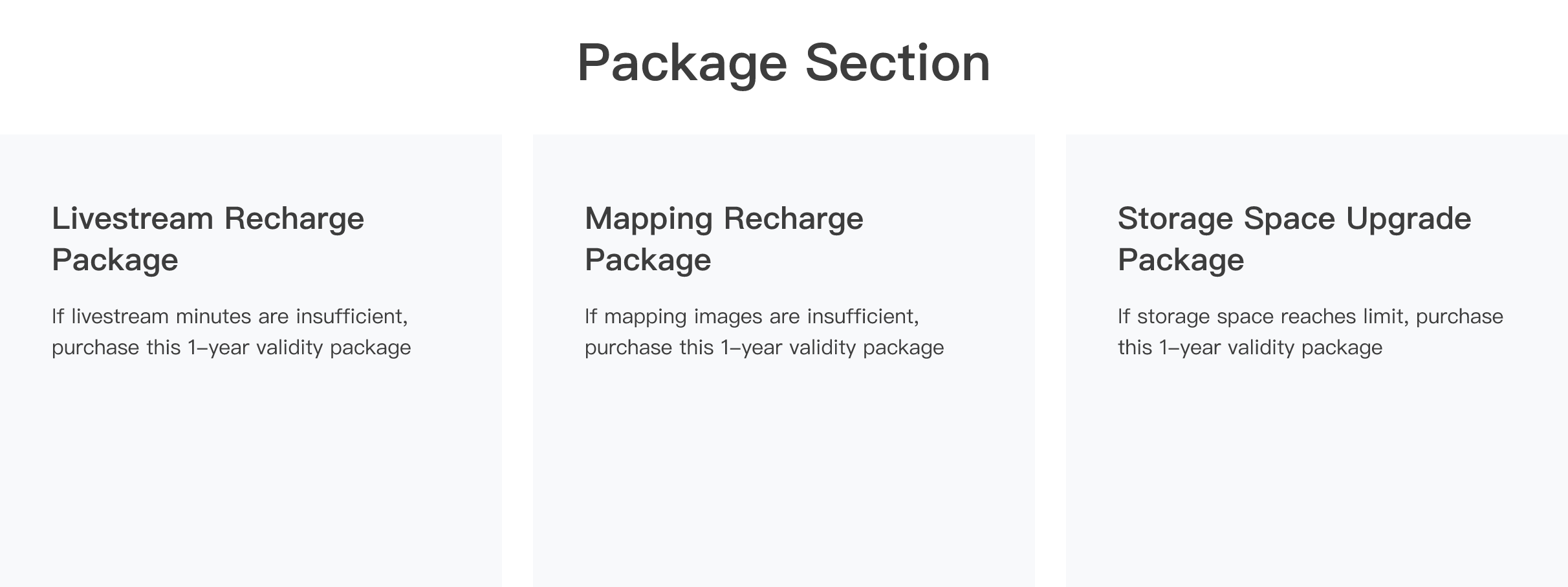
Recharge/Upgrade packages can be used with both the Standard and Business versions to supplement specific resources without adding feature entitlements to the existing package. Purchase them as needed when more resources are required.
| Feature | Livestream Recharge | Mapping Recharge | Storage Upgrade |
|---|---|---|---|
| Options | 10,000 min/year 100,000 min/year | 30,000 images/year 300,000 images/year | 500 GB/year 5 TB/year |
| Activation Period | 6 months | ||
| Usage Period | 1 year | ||
Recharge / Upgrade Validity and Usage Notes
- Feature Entitlements: Supplements livestream minutes, mapping images, or storage space only, without adding other feature entitlements.
- Activation Period: 6 months. Activate within the activation period; otherwise the package will expire. Calculated from the delivery date of your activation code (sent via email or SMS).
- Usage Period: 1 year, beginning on the date of activation.
5 Enterprise Plan
The Enterprise Version is designed for high-frequency and government/enterprise users, providing full features, advanced capabilities, and higher resource quotas. It does not limit bound devices, but restricts the number of simultaneously online devices.
Enterprise - Base Plan
Base Package
| Package | Activation Period | Usage Period | Simultaneous Devices | Livestream Minutes | Storage Space | Mapping Images |
|---|---|---|---|---|---|---|
| 1 Year, 1 Device | Unlimited | 1 year | 1 | Unlimited*Combined dock camera livestream minutes: 30,000 | Unlimited | 150,000 |
| 3 Years, 1 Device | Unlimited | 3 years | 1 | Unlimited*Combined dock camera livestream minutes: 100,000 | Unlimited | 500,000 |
Advanced Capabilities: Third-party account login (SSO login), and other advanced features.
No bound device limits, but simultaneous online device limits apply:
The number of aircraft is limited when logging into the cloud via a remote controller. The number of docks is also limited when logging into the cloud. In dual-control scenarios, where one aircraft is simultaneously controlled by a remote controller and a dock, it counts as only one online device.
Restriction Method: On the device management page, the number of devices that can be added to projects is limited.
Enterprise - Online Device Expansion Package
Add-on Package
To increase your simultaneous device limit, purchase an Online Device Expansion package. Contact your authorized dealer for details.
- Multiple Online Device Expansion packages can be cumulative within the validity period of the Enterprise base package.
- Expansion Packages Needed = (New Device Count - Current Device Count) × Remaining Years (rounded up).
- Each device capacity expansion adds 150,000 mapping images and 30,000 minutes of Dock camera livestreaming.
| Before Expansion | After Expansion | Packages Needed | Explanation |
|---|---|---|---|
| 1 Year, 1 Device | 1 Year, 3 Devices | 2 expansion packages | Adds 2 devices within the 1-year usage period. 2 expansion packages are required.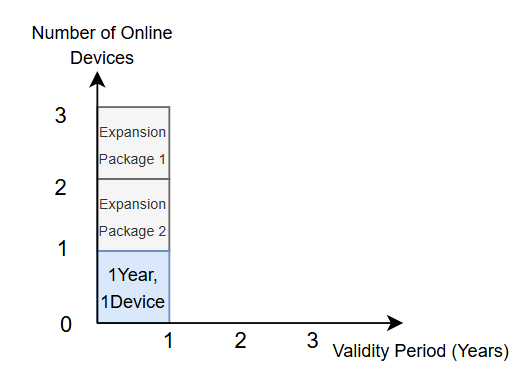 |
| 3 Years, 1 Device | 3 Years, 2 Devices | 3 expansion packages | Adds 1 device within the 3-year usage period. 3 expansion packages are required to cover the 3-year usage period.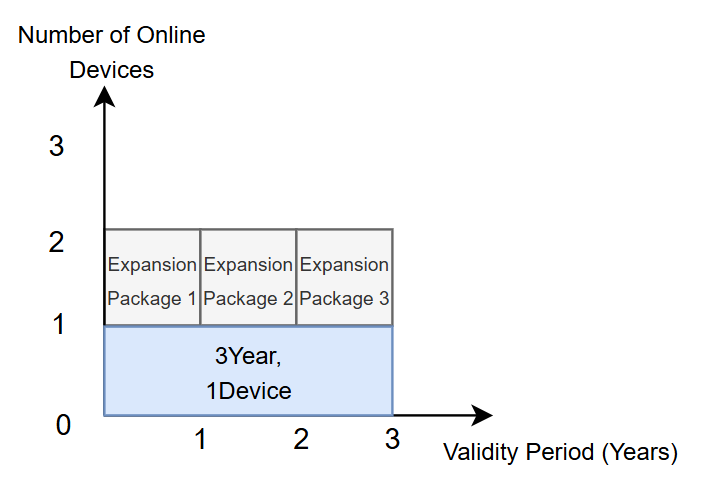 |
Purchase Channels and Guide
You can purchase the Enterprise Version through the DJI Store and authorized dealers. Recommended configurations for different requirements are as follows:
| Requirement | Recommended Configuration | Chart |
|---|---|---|
| 4 devices for 1 year | 1-year, 1-device base package + 3 expansion packages | 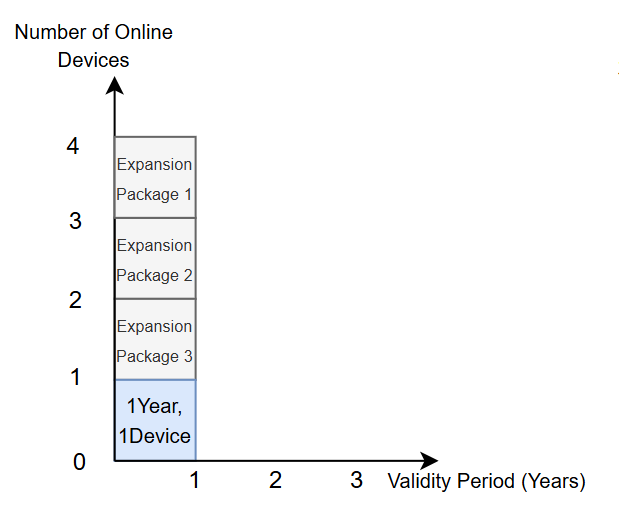 |
| 3 devices for 4 years | 1-year, 1-device base package + 3-year, 1-device base package + 8 expansion packages | 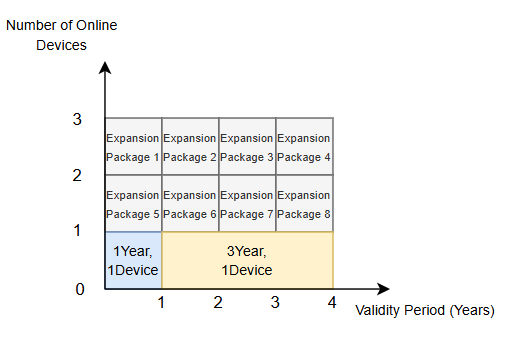 |
| 4 devices for 4 years | 1-year, 1-device base package + 3-year, 1-device base package + 12 expansion packages | 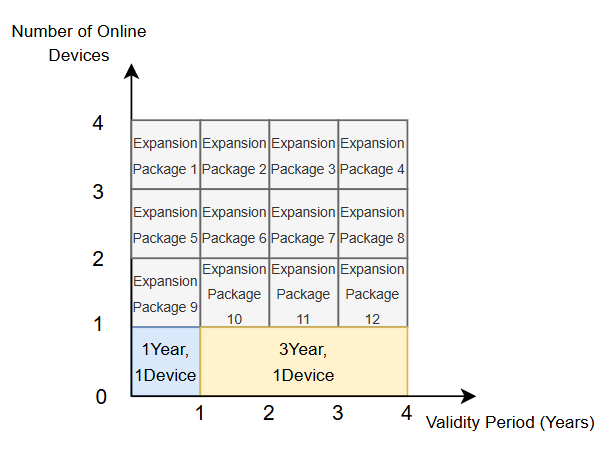 |
FAQ
Q: What happens if I activate an Enterprise package while having an active Business Version or recharge package? After activation, will the remaining resources of existing packages expire?
Q: Can I add a Business Version or recharge package while my Enterprise package is active?
Q: Can I activate a new Enterprise package if I already have one?
Q: Can I activate a device expansion package without a base Enterprise package?
Q: Can I activate different types of Enterprise base packages at the same time?
Enterprise Plan Validity and Purchase Notes
- Activation Period: Unlimited.
- Usage Period: 1 year or 3 years based on the base package, beginning on the date of activation.
- Expansion Requirements: Online Device Expansion packages must be paired with a valid Enterprise base package.
- Purchase Method: Available through authorized dealers or the DJI Store.
6 On-premises Version
The on-premises version is designed for users who require intranet deployment.
Core Features
- Unlimited livestream minutes, storage space, and mapping images; the current version supports up to 2,000 photos per single mapping task.
- Supports advanced capabilities such as third-party account login (OAuth 2.0) and custom login pages.
- No bound device limits, but simultaneous online device limits apply: remote controller cloud connection limits aircraft; dock cloud connection limits docks; dual-control scenarios count as 1 device.
Package Types
Please contact your authorized dealer for details:
| Category | Package Type | Description |
|---|---|---|
| Base Package | 1-device version | Supports 1 simultaneous online device, expandable. |
| Device Expansion | +1 device | Adds 1 more simultaneous online device on top of the base package. |
| +5 devices | Adds 5 more simultaneous online devices on top of the base package. | |
| Upgrade Validity Extension | 1 year / device | The base package includes 1 year of free upgrade validity. Purchase this package to extend the validity. |
| Advanced Feature Package | Cloud Mapping | Cloud mapping is not included in the base package. Purchase separately if needed. |
| 4G Enhanced Transmission | 4G Enhanced Transmission is not included in the base package. Purchase separately if needed. |
On-premises Version Validity and Purchase Notes
- Upgrade Validity: Base packages include 1 year of free upgrade validity. Purchase extension packages to extend.
- Expansion Requirements: Device expansion packages must be paired with an On-premises base package.
- Purchase Method: Contact your authorized dealer for package configurations and pricing.
Appendix: View Full Package Comparison
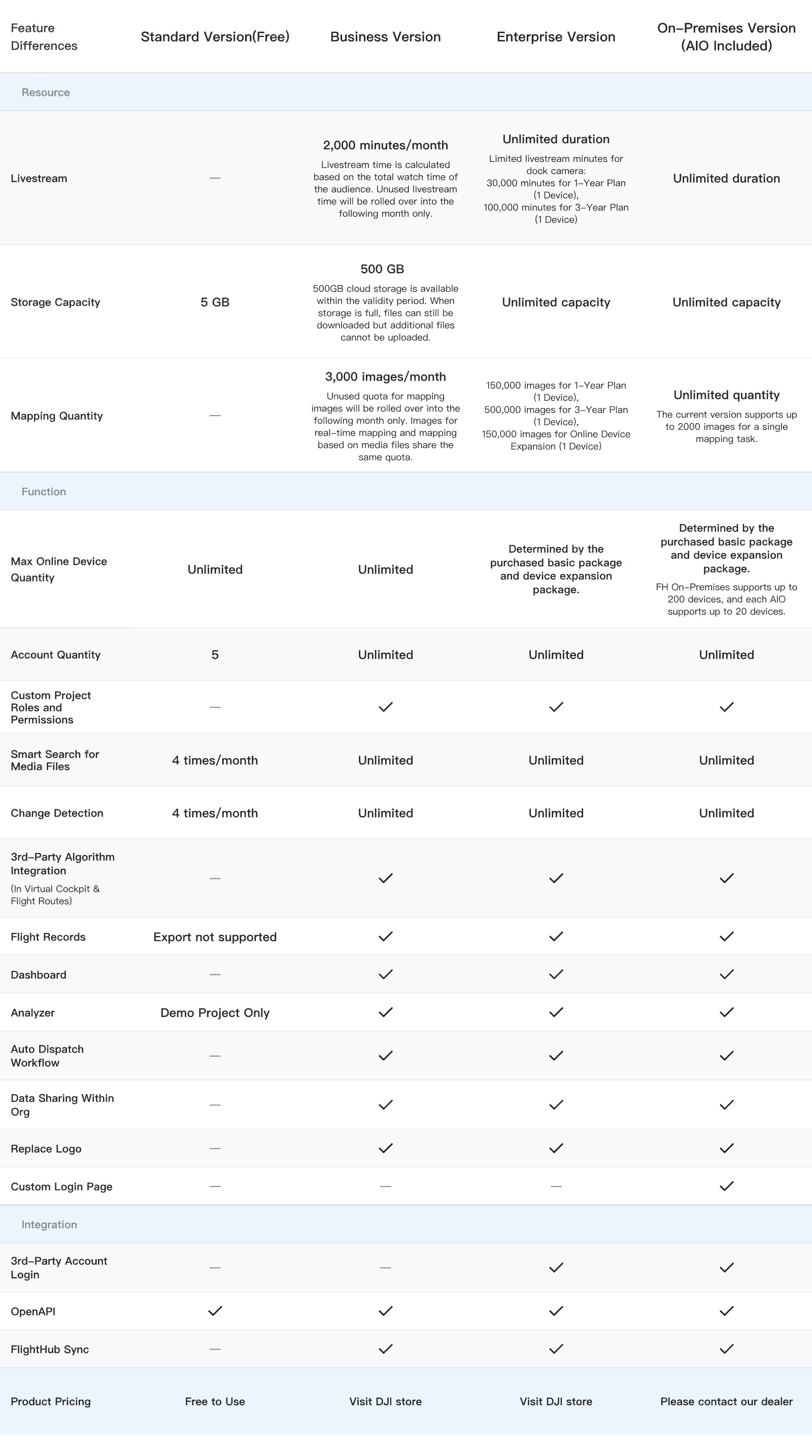
When Standard or Business Version resources are insufficient, they can be supplemented by purchasing the following Recharge/Upgrade packages: