
OpenAPI V1.0
API Introduction
DJI FlightHub 2 OpenAPI is an open platform based on RESTful specifications, designed to provide developers with the ability to interact with third-party cloud platforms and DJI FlightHub 2.
Here are some key features of OpenAPI:
- RESTful Design: Adopts RESTful specifications, making the use of the API more intuitive and compliant with web standards. Developers can interact with FlightHub 2 using standard HTTP methods such as GET, POST, PUT, and DELETE.
- Authentication and Authorization: Implements secure authentication and authorization mechanisms to protect API resources and manage access permissions effectively.
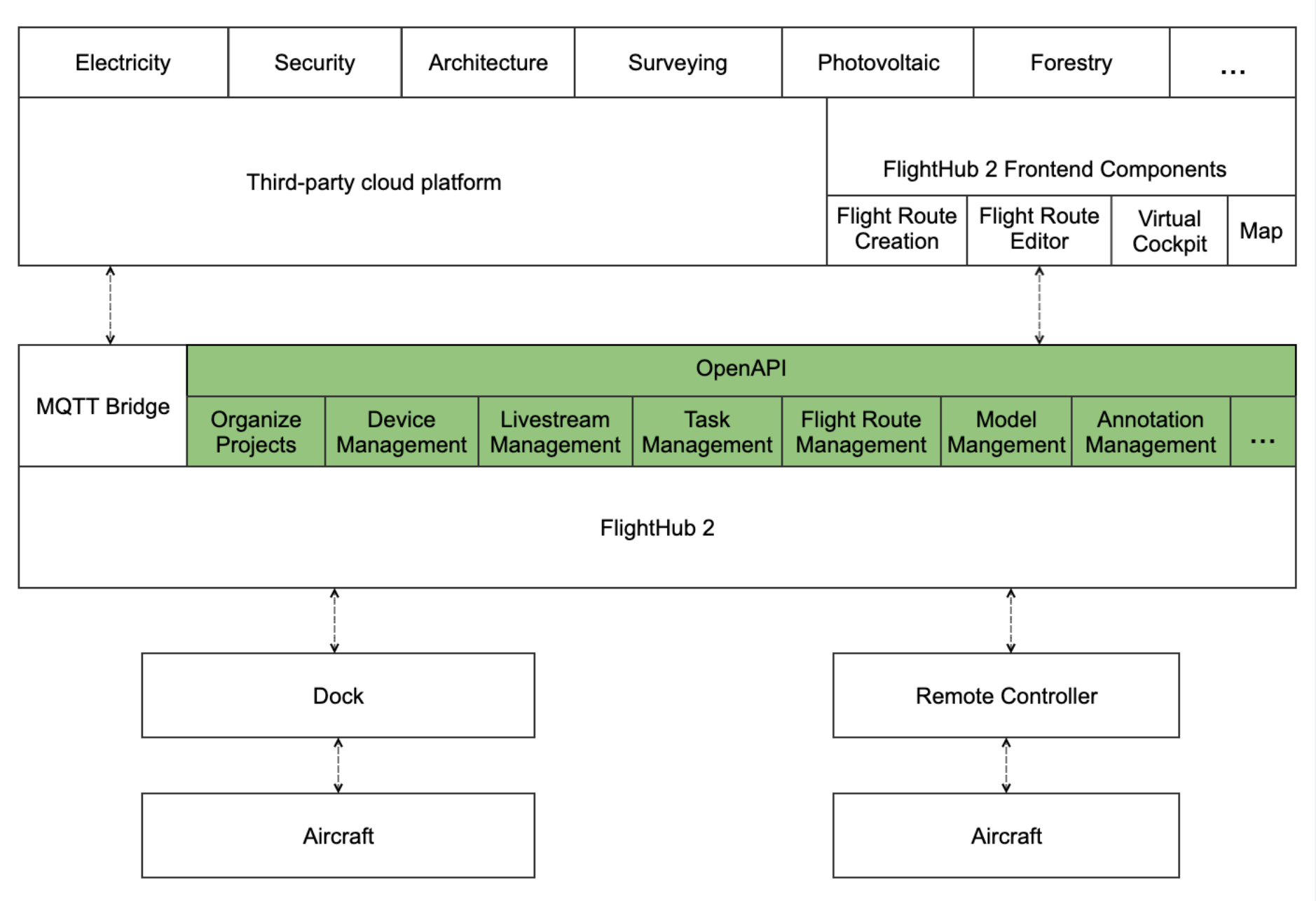
- FlightHub 2 Interaction: Offers features such as DJI FlightHub 2 organization and project management, device management, livestream management, flight route management, task management, model management, and annotation management.
- Developer Support and Documentation: Offers detailed API documentation, code examples, and developer support, enabling rapid integration and effective utilization of platform features.
Developers can quickly integrate the core features of FlightHub 2 by calling OpenAPI, significantly reducing development costs and meeting various business needs and innovative application scenes.
Product Architecture
Quick Start
Environment Setup
Refer to the DJI FlightHub 2 On-Premises Version Deployment Manual to deploy the FlightHub 2 on-premises version.
Authentication and Authorization
Refer to the Authentication and Authorization tutorial to understand the principles of OpenAPI authentication and authorization, obtain the values of X-User-Token and X-Project-Uuid, and enter these two values in the header field to ensure the security of OpenAPI and achieve access control to FlightHub 2.
Sample Code
1. Query FlightHub 2 System Status
FlightHub 2 public version uses API to query system status: Query FlightHub 2 System Status
After the FlightHub 2 on-premises version is successfully deployed, call the method to check the system status: Query FlightHub 2 System Status
```http
GET /openapi/v0.1/system_status HTTP/1.1
Host: 127.0.0.1:30812
X-Language: en
X-User-Token: xxxxxxxx
A return value of 0 indicates that the FlightHub 2 system is operating normally.
```http
{
  "code": 0,
  "message": ""
}
2. Get the List of Projects Under the Organization
Create an organization, set up a project, and bind devices in FlightHub 2. Refer to the DJI FlightHub 2 User Manual > Organization Management section on creating organizations and projects in FlightHub 2, then call the Get the List of Projects under the Organizationmethod to obtain the list of created projects.
```http
GET /openapi/v0.1/project HTTP/1.1
Host: 127.0.0.1:30812
X-Language: en
X-User-Token: xxxxxxxx
The list of created projects will be returned.
```http
{
  "code": 0,
  "message": "OK",
  "data": {
    "list": [
      {
        "name": "c2c_test",
        "introduction": "a",
        "uuid": "93df839d-ae74-4f04-842e-2f1f81c89a66",
        "org_uuid": "105ddd05-34ce-46b6-a872-cb32b8c98f64",
        "created_at": 1702498686,
        "updated_at": 1702498686,
        "project_work_center_point": {
          "latitude": 22.906899500237845,
          "longitude": 113.69995967214662
        }
      }
    ]
  }
}
3. Start Livestream
Refer to the DJI FlightHub 2 User Manual > Device Management section on binding devices in FlightHub 2, then refer to the Livestream Management tutorial, and call the Enable Livestream method to start streaming.
```http
POST /openapi/v0.1/live-stream/start HTTP/1.1
Host: 127.0.0.1:30812
X-Project-Uuid: xxxxxxxxxx
X-Language: en
Content-Type: application/json
X-User-Token:  xxxxxxxx
Content-Length: 120

{
    "sn": "7CTDM3Dxxxxxx",
    "camera_index": "165-0-7",
    "video_expire": 7200,
    "video_quality": "adaptive"
}
The livestream link will be available at data.url, where you can visit to view the livestream.
```c
{
  "code": 0,
  "message": "",
  "data": {
    "expire_ts": 1764751629,
    "url": "http://127.0.0.1:30806/rtc/v1/whep/?app=live&stream=7CTDM3Dxxxxxx_165-0-7&token=eyJhbGciOiJIUzI1NiIsInR5cCI6IkpXVCJ9.eyJwcm9kdWN0X2lkIjoiNzEzNTE5ZmIxYjRlNDRiYTlkMjdkMDJhOGRlZDk5NGQiLCJjaGFubmVsX25hbWUiOiI3Q1RETTNEMDBCWk5WWl8xNjUtMC03IiwidWlkIjoxDAxMTQsImFjdGlvbiI6InBsYiLCJleHAiOjE3NjQ3NTE2MzAsIm5iZiI6MTczMzIxNTYzMCwiaWF0IjoxNzMzMjE1NjMwfQ._AysitutpprlgYGFy4lDL_gSv4Y3hl_te-yxoFVHZb4",
    "url_type": "srs"
  }
}
Interface Tutorial
- The interface tutorial includes the OpenAPI feature list, tutorials, method list, and descriptions. Refer to the OpenAPI Interface Tutorial for more details.